Robert Pattinson Memory1.0
Publisher Description
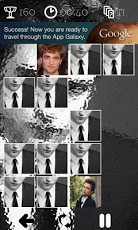
Robert Pattinson was born on May 13, 1986, in London, England. He enjoys music and is an excellent musician, playing both the guitar and piano.When Robert was 15, he started acting in amateur plays with the Barnes Theatre Company. Afterward, he took screen role like Curse of the Ring (2004) (TV) (Kingdom of Twilight) as Giselher.In 2003, Robert took on the role of Cedric Diggory in Harry Potter and the Goblet of Fire (2005). He got his role a week later after meeting Mike Newell in late 2003.He has since been cast as a vampire Edward Cullen in the highly-anticipated film, Twilight (2008/I). He shared the lead roles with his co-stars Kristen Stewart and Taylor Lautner playing Edward Cullen, Bella Swan and Jacob Black.His music will also be heard in the film. Additionally, Robert has completed upcoming roles as Salvador Dalàin Little Ashes (2008) and Art in How to Be (2008).Keywords: memory game, pairs
About Robert Pattinson Memory
The company that develops Robert Pattinson Memory is Borza Industries. The latest version released by its developer is 1.0. This app was rated by 1 users of our site and has an average rating of 3.0.
To install Robert Pattinson Memory on your Android device, just click the green Continue To App button above to start the installation process. The app is listed on our website since 2012-05-17 and was downloaded 9 times. We have already checked if the download link is safe, however for your own protection we recommend that you scan the downloaded app with your antivirus. Your antivirus may detect the Robert Pattinson Memory as malware as malware if the download link to eu.borzaindustries.robertpattinson is broken.
How to install Robert Pattinson Memory on your Android device:
- Click on the Continue To App button on our website. This will redirect you to Google Play.
- Once the Robert Pattinson Memory is shown in the Google Play listing of your Android device, you can start its download and installation. Tap on the Install button located below the search bar and to the right of the app icon.
- A pop-up window with the permissions required by Robert Pattinson Memory will be shown. Click on Accept to continue the process.
- Robert Pattinson Memory will be downloaded onto your device, displaying a progress. Once the download completes, the installation will start and you'll get a notification after the installation is finished.
Program Details
System requirements
Download information
Pricing
Version History
version 1.0
posted on 2012-05-17
version 1.0
posted on 2012-05-17
Several fixes and updates
